nvk_VARIATIONS
Create variations from items in Reaper
Games need several versions of most sounds, and making them by hand means copying items and nudging pitch, volume, and timing one at a time. The script copies the selected items into as many variations as you set, and randomizes pitch, volume, pan, tone, position, and takes within the ranges you choose.
Purchases go through Gumroad.com
- 14-day trial, no card needed
- Updates through ReaPack
- macOS & Windows, Reaper 7+
- Multi-user licenses available
Hear the variations
An impact made of three layers on three tracks, followed by the variations made from it. Each item has four takes, and each variation moves to the next one, so they differ before anything is randomized. The settings below randomize on top of that. Play them in turn, or tap one to hear it alone.
The sound is synthesized in your browser to show what the settings do. Takes change as in the script's Default mode; Random would pick them at random. Pitch uses the Playrate mode, so a higher pitch also makes the item shorter, as it does in Reaper. Pitch Envelope and Volume Envelope add random points to envelopes inside each item, within the Pitch and Volume ranges.
How it works
-
Select items
Select the items that make up the sound, on one track or layered across several. Each variation copies all of them.
-
Run nvk_VARIATIONS
Set the Amount and how far pitch, volume, pan, tone, and position can move. Press F and D to jump between variations while you listen.
-
Apply
Click Apply or press Enter. Set Amount to 0 to randomize the selected items in place without making copies.
Features
Takes in order or at random
The Default mode moves to the next take in each item for every variation, and Random picks one. Chaos moves to a random offset in each item, and None keeps the same take.
Pitch, volume, pan, and tone
Pitch shifts in semitones by Playrate or Shift. Volume varies in dB, with a chance to mute an item. Tone adds ReaEQ to each item and randomizes its bands.
Randomized envelopes
Pitch, Volume, Pan, and Tone each have an Envelope setting that adds random points inside every item, so even one sound moves differently in each variation.
Item overrides
Turn a section off for one item to keep that layer consistent, like a sub that stays at its pitch while the layers above it vary.
Presets on hotkeys
Save settings in preset tabs. The Randomize and New Variation preset scripts run a preset on the selected items without opening the window, so they can go on a key.
Position and track shuffle
Offset moves each item's position at random. Track sets the chance that items swap tracks, so variations run through different effects.
Settings
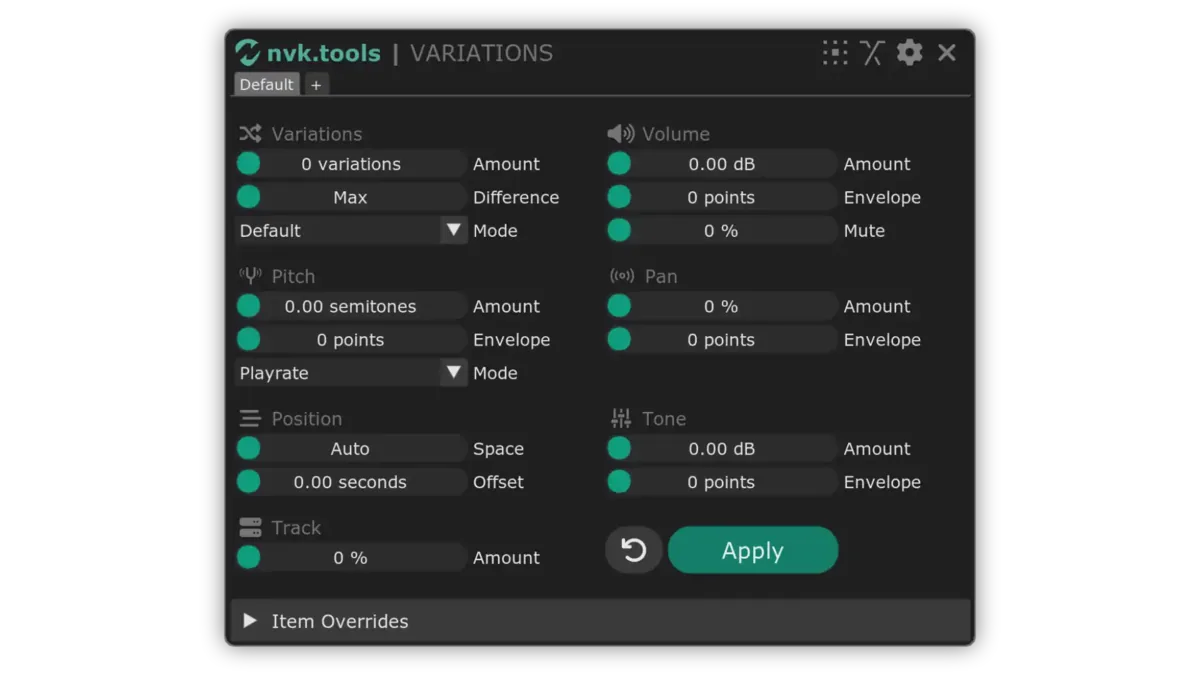
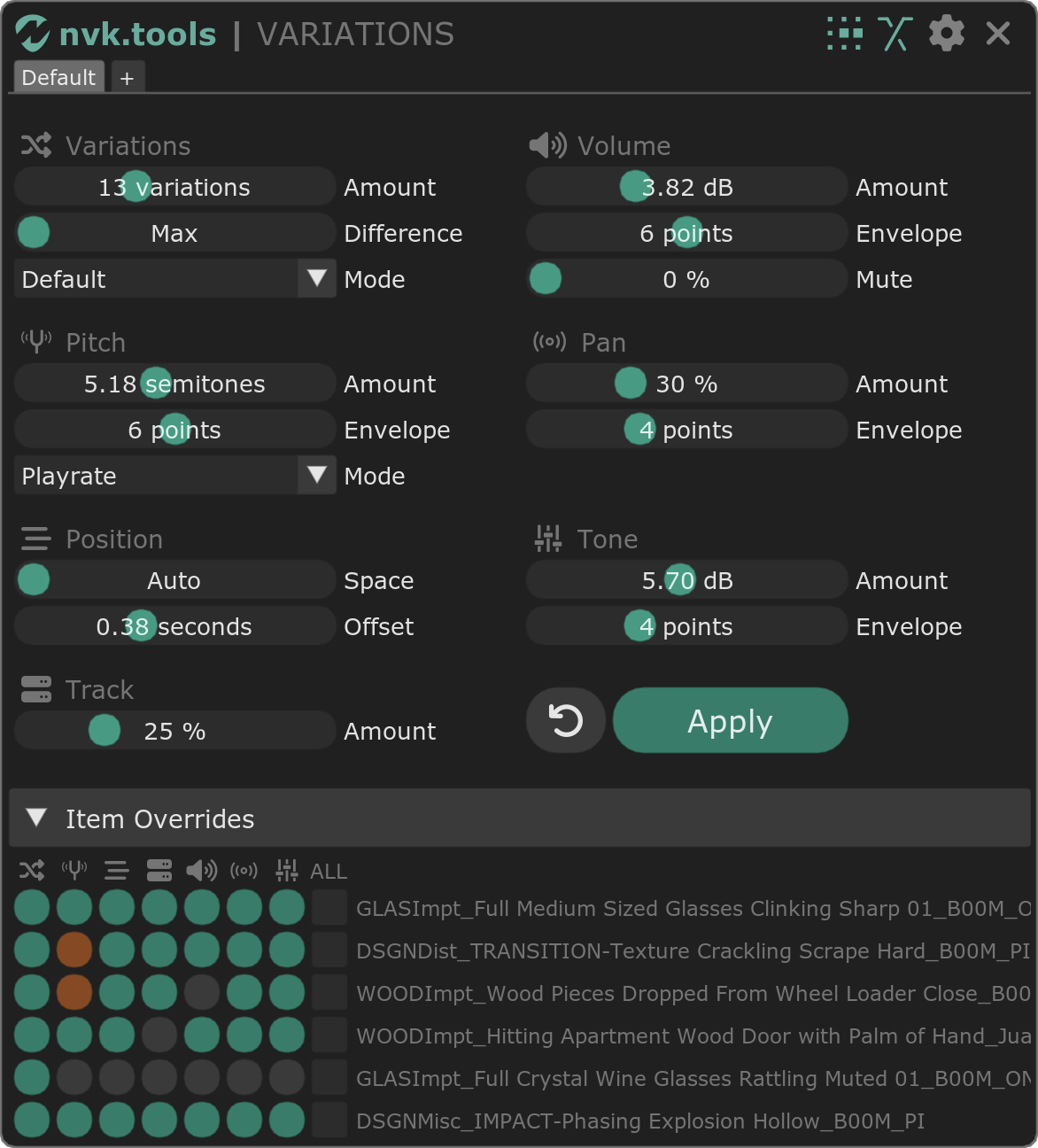
Every setting is in one window. Tabs along its top hold presets, and the preset scripts run them from a hotkey.
- Variations
- How many variations to make, how far their lengths can differ, and the Mode that picks takes.
- Pitch
- Random pitch in semitones, a pitch envelope, and Playrate, Shift, or Random between the two.
- Position
- Space between variations (Auto fits them to their length) and a random Offset for each item.
- Track
- The chance that items in each variation swap tracks.
- Volume and Pan
- Random level and pan, envelopes for each, and a chance to mute an item.
- Tone
- ReaEQ on each item with random gain on each band, and an envelope for the EQ.
- Item Overrides
- A row of toggles for each selected item, to leave it out of any section.
FAQ
Can I try it before buying?
Yes. The script includes a 14-day trial with no card required. Install it by following the install guide, then run it in Reaper. When the license prompt appears, leave the field blank and click OK.
Does it work with sounds layered across several tracks?
Yes. Select the items on every track that makes up the sound, and each variation copies all of them. Item Overrides leave a layer out of a section, for example to keep a sub layer at its original pitch.
What happens to other items in the project?
Ripple mode decides. With ripple on, items on other tracks that overlap the new variations move right to make room. With it off, they stay where they are. There's also an option to create the variations in lanes instead of as new items on the track.
Which versions of Reaper and which systems are supported?
Reaper 7 or later on macOS and Windows.
What do I need before installing?
Reaper, ReaPack, the SWS/S&M Extension, ReaImGui, and the js_ReaScript API. The scripts install through ReaPack; the install guide walks through every step.
Can I use my license on more than one computer?
Yes. Each seat may be activated on up to four computers at a time, all used by the same person.
Can I buy licenses for a team?
Yes. Use the team license option at the bottom of this page to choose how many people need it, and you'll get one multi-user key. Questions? Email support@nvk.tools.
nvk_VARIATIONS
Updates through ReaPack. Try it free for 14 days before you buy.
Purchases go through Gumroad.com
Buying for a team? Choose how many people need it and you'll get one multi-user key. Each person can use it on up to four of their own computers. Regular price $99, now $99 per license.
The Everything Bundle includes nvk_VARIATIONS and every other nvk.tools script for less than buying them separately.
See the bundle